DSLR HD Camera : 4K HD Camera
DOSA AppsBeauty
4.5315.00 Reviews
- Version
- 7.1.4
- Installs
- 10.00M
- Age Rating
- Everyone
Screenshots
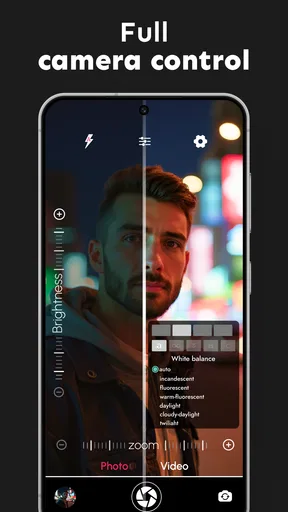
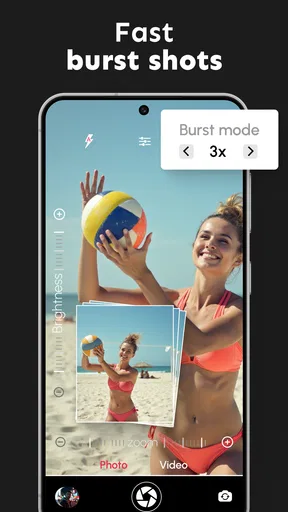
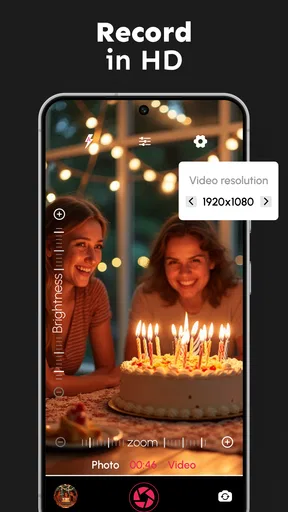
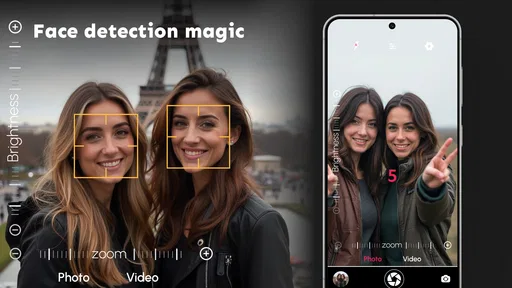
Our Review of DSLR HD Camera : 4K HD Camera
 Analysis by Appyee
When I decide whether a camera app suits my day, I look beyond the promise of polished pictures: I want to know whether it fits the moment, how much control it gives me, and whether network conditions get in the way. DSLR HD Camera : 4K HD Camera is a free photography app from DOSA Apps, aimed at people who want camera controls and editing options on a phone. It has an average rating of 4.4 from around 68,000 ratings and more than 10 million installs, so it has reached a sizable audience, though popularity alone cannot tell you how it will feel on your device.
Using the camera in real-life conditions
I use this section to think through how the app fits into ordinary moments, from setting up a shot to deciding what to do when the phone or connection is not cooperating. A useful habit is to test one important control before an outing, then keep the rest of the workflow simple when a scene is moving quickly. That makes it easier to judge whether the app suits the way you actually take pictures.
Network-dependent moments
A camera app is most useful when it lets you concentrate on the scene rather than on a connection. This one is built around taking pictures and working with filters and blur effects, but I would avoid assuming that every part of the experience behaves the same way when a network is unavailable. If you are heading somewhere with unreliable reception, open the app beforehand and check the controls you plan to use. That small test is more useful than discovering a limitation while a fleeting moment is happening.
For a walk through a busy market, for example, I would settle exposure and focus before lifting the phone to take a quick picture. The ability to adjust those settings can be helpful when bright signs, shaded stalls, and moving people all compete in one frame. Network access is not the thing that makes that shot; preparation and a steady hand matter more. Still, checking the app in advance helps separate the core camera workflow from anything that might depend on connectivity.
Mobile contexts and practical workflows
The strongest case for this kind of app is spontaneous photography: a detail on a building, a friend’s celebration, or an evening sky that changes by the minute. You do not need to carry a separate camera to try manual focus or exposure adjustments. I would start with one setting at a time rather than changing several together. If a photo looks too bright or the subject is soft, you can tell which adjustment helped, instead of guessing what went wrong.
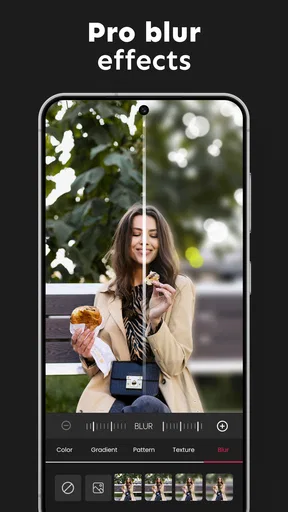
Filters and blur editing suit a different stage of the process. I find it sensible to take a clean version first, then experiment with effects afterward. That gives you a straightforward original to compare against a more stylized result and makes it easier to avoid overdoing a look simply because it is available. For portraits, a restrained blur can draw attention toward a face; for a busy street scene, the same effect may remove context that makes the image interesting.
On a day out, I would also think about storage and battery before recording a long clip. The app’s camera tools do not change the practical demands of high-resolution video: longer recordings can use more space and keep the phone working harder. If you want a short keepsake, record the important moment rather than leaving the camera running through everything around it. A quick test clip at the start can also help you check framing and handling before the event you actually want to preserve.
Failure, recovery, and sensible expectations
Camera apps can be affected by more than their own interface. Phone hardware, available storage, lighting, and background activity all shape the result, so I would not treat a smooth experience on one device as a promise for every phone. If the preview stutters or the app does not respond as expected, I would close other demanding apps, make room for new media, and reopen the camera before an important shot. Those are practical checks, not guarantees, but they can prevent avoidable frustration.
Manual controls also bring a small learning curve. More choice is useful when the automatic result misses the mood, but it can slow you down if you are trying to catch a child, pet, or moving subject. In those moments, I would favor a quick capture over carefully tuning every control. Save the experimenting for a still scene, where you can compare a couple of exposure or focus choices without feeling that the moment is slipping away.
Connectivity is worth treating as a separate part of reliability. If you are unsure whether a particular feature needs a network, test it before relying on it, and avoid making a one-time photo depend on a step you have not tried. The app is a phone camera tool, not a substitute for planning: keep the device charged, check that there is room for the media you intend to create, and make sure you can reach the controls comfortably.
Data-conscious use and the right comparison
For data-conscious use, I would do the editing and browsing of effects when I have a dependable connection rather than assume every operation is connection-free. When recording video away from home, remember that the larger practical concern may be local storage and battery rather than mobile data itself. If you later choose to share a clip through another service, that sharing step can use data; the camera capture and the eventual upload are distinct parts of the workflow.
Compared with a phone’s built-in camera, this app’s appeal is the emphasis on DSLR-style controls alongside filters and blur editing. The built-in option is often the quicker choice when you just want to point and shoot, especially if you already like its default processing. A dedicated photo editor may offer a more focused editing workflow, while a physical camera remains the better fit for people who need interchangeable lenses or dependable, advanced control. I see this app as a convenient middle ground for experimenting on a phone, not as a way to turn phone hardware into a professional camera.
DOSA Apps offers it free, with in-app purchases listed from $0.99 to $99.99 per item. It is rated for Everyone, and version 7.1.2 requires Android 7.0 or later. Those details make it easy to judge basic compatibility and the possibility of optional spending, but I would still look carefully at any purchase prompt before confirming it. The app is best for casual photographers who want to explore focus, exposure, and visual effects without carrying extra gear; people who prefer a simple shutter button, need a strictly predictable offline workflow, or require advanced camera hardware may be happier elsewhere.
Features That Make You Go Wow!
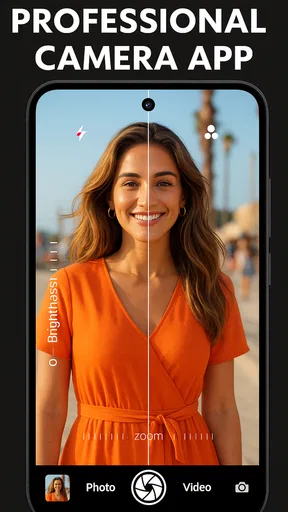
First things first, the app boasts a pretty impressive array of features. You get to play around with manual focus and exposure, just like you would on a real DSLR. And let me tell you, being able to tweak these settings can make all the difference in your photo game.
Another cool feature is the 4K video recording. Yes, you heard it right! Now you can capture videos in stunning 4K resolution. Imagine recording those beautiful sunsets or your friend’s birthday party in such high quality.
User Experience
Using the app is a breeze! The interface is user-friendly and doesn’t require a degree in photography to navigate. You’ve got everything laid out in a very intuitive way, which makes snapping those spontaneous shots super easy.
The app also offers a bunch of filters and effects. While some might argue that too many filters spoil the broth, I’d say they add a nice touch when you’re feeling a bit artsy. Plus, who doesn’t like a little pop of color or a vintage vibe every now and then?
Performance and Reliability
Now, let’s talk about performance. The app runs smoothly without any noticeable lags, which is a huge plus. I’ve tried several camera apps in the past, and nothing kills the mood faster than an app that crashes when you’re about to capture that perfect shot.
With DSLR HD Camera : 4K HD Camera, you get a reliable experience. It’s like having a little photography assistant right in your pocket, ready to go whenever inspiration strikes.
Final Thoughts
All in all, if you’re looking for a camera app that gives you more control over your photography without the fuss of a physical DSLR, this app is worth checking out. It combines the best of both worlds – professional features with the convenience of your smartphone.
So, next time you’re out and about and spot something you want to capture, remember that you’ve got the power of a DSLR right in your hand. Happy snapping!
My practical verdict is to try it on the kinds of scenes you actually photograph, rather than judge it by the name alone. Take a still subject to learn how focus and exposure respond, then try a short video and a restrained edit. If those steps feel comfortable on your phone, this can be a handy way to get more involved in everyday photography. If you want the fastest possible point-and-shoot experience, or depend on a feature that must work without a network, test that exact workflow first or stick with the camera option you already trust.
Privacy and Permissions
See what permissions an app requests and how it handles your data.
- Photos/Media/Files
- read the contents of your USB storage, modify or delete the contents of your USB storage
- Storage
- read the contents of your USB storage, modify or delete the contents of your USB storage
- Camera
- take pictures and videos
- Microphone
- record audio
- Wi-Fi connection information
- view Wi-Fi connections
- Other
- view network connections, full network access, control vibration, prevent device from sleeping, Google Play license check
Verdict
Strengths of DSLR HD Camera : 4K HD Camera
- High-quality 4K video recording.
- Intuitive and user-friendly interface.
- Wide range of manual controls.
- Supports RAW image format.
- Fast auto-focus capability.
Limitations of DSLR HD Camera : 4K HD Camera
- Contains in-app advertisements.
- Limited features in the free version.
- Requires high storage for 4K videos.
- May drain battery quickly.
- Occasional app crashes reported.
Other Releases by DOSA Apps
View All
Cube Cipher - Cube Solver
Educational4.5

Recover Deleted Photos App
Photography4.4

Cleanup Your Phone
Personalization4.5

Microphone Amplifier
Medical4.2
Similar Picks in This Category
View All
Beauty Makeup Editor & Camera
Photo & Video Editors - Instant Solution4.7

Perfect365: Face Makeup Editor
Perfect365, Inc.3.5

Mirror Plus - HD Mirror app
Digitalchemy, LLC4.8

Cute Lock Screen & Wallpapers
Prometheus Interactive LLC4.6

HD Camera for Android
One Music Player4.5

Phone Mirror app - True Mirror
Cards4.6
Frequently Asked Questions
What are the main features of the DSLR HD Camera: 4K HD Camera app?
The DSLR HD Camera app offers a variety of advanced photography features, including manual controls for ISO, shutter speed, and focus. It supports 4K video recording, live filters, and a powerful HDR mode. Additionally, it includes a night mode and real-time color effects to enhance your photography experience.
Is the DSLR HD Camera app user-friendly for beginners?
Yes, the DSLR HD Camera app is designed with an intuitive interface that caters to both beginners and advanced users. It provides easy-to-use presets and automatic settings for novices, while also offering manual controls for those who want to fine-tune their photography skills.
Does the app support photo editing capabilities?
The DSLR HD Camera app includes basic photo editing features, allowing users to adjust brightness, contrast, and saturation directly within the app. It also provides a selection of filters and effects to enhance your photos, making it a versatile tool for both capturing and editing images.
Are there any in-app purchases or advertisements in the DSLR HD Camera app?
While the basic version of the DSLR HD Camera app is free, it may contain advertisements. Users have the option to purchase a premium version, which removes ads and unlocks additional features such as advanced filters and editing tools, offering a more seamless experience.
What devices are compatible with the DSLR HD Camera app?
The DSLR HD Camera app is available for both Android and iOS devices. It is optimized for a wide range of smartphones and tablets, though the full range of features may be best experienced on newer devices with higher processing capabilities and better camera hardware.
